Self-hosted VMS for Mac & Linux · Sentinel 2.0

Your cameras. Your machine.
Your footage.

Sentinel is a free, self-hosted video management system for IP cameras. Record every camera at full quality, get alerts for people and vehicles, and watch from anywhere, while every frame stays on hardware you own. Start on one machine and grow to many. No subscriptions, ever.

Mac & Linux (beta) · iPhone app on the App Store · unlimited cameras, free
Sentinel Operator, Sentinel Admin and the multi-server platform are part of 2.0, shown below.
Sentinel Operator workspace in Live mode: a sidebar listing saved views and cameras grouped by recording server, and a 2×2 grid showing Front Entrance, Parking, Loading Dock and Lobby, each marked recording and online
ONVIF & RTSP On-device AI H.264 / H.265 recording Mac, Linux & iPhone No cloud storage Unlimited cameras, free
The platform

One program. A role for every machine.

Sentinel 2.0 is a single server program that can take on different roles. Small sites run everything on one machine; bigger ones add machines as they grow.

Role

Management Server

Users and permissions, alarms and rules, the audit log, and the web-based Sentinel Admin. It stores no video, so it stays small and easy to back up.

Role

Recording Servers

Connect to cameras, record, detect, and serve video straight to viewers. They keep recording, and keep serving live and playback, even if the Management Server is down.

Clients

Admin, Operator, Mobile

Sentinel Admin in your browser, Sentinel Operator on macOS and Linux for the live wall and investigations, and Sentinel Mobile for iPhone.

The downloads below are Sentinel Operator for Mac 2.1.0 (server included) and the Sentinel 2.2.0 server for Linux.

Sentinel Admin

One site, many servers

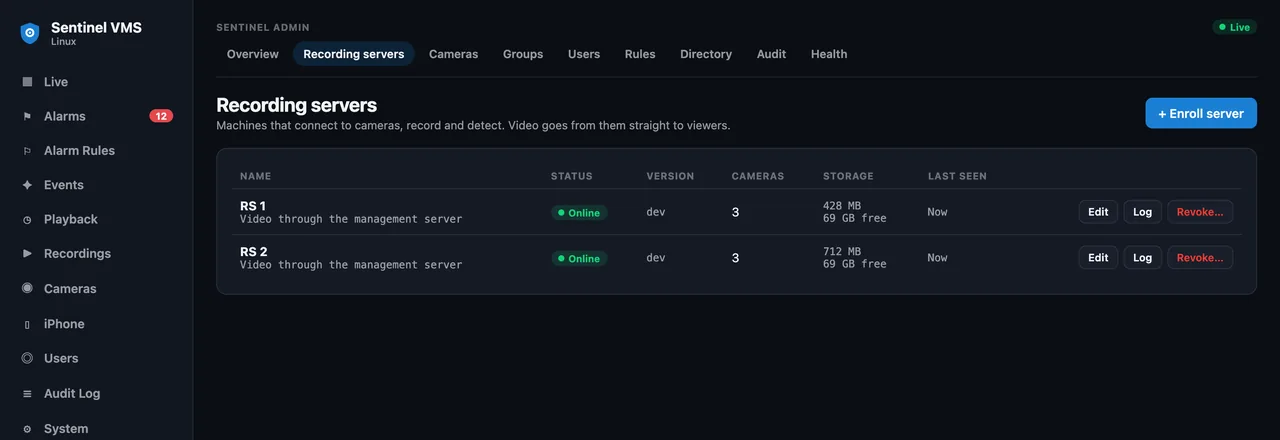
Start with one machine running both roles. When the site grows, enroll another machine as a Recording Server with a one-time token: paste one command on the new machine and it joins. Sentinel Admin shows every server, its status, cameras and free storage in one place.

  • ✓ Small sites run the Management Server and a Recording Server on the same machine
  • ✓ Add a machine with a one-time token and a single pasted command
  • ✓ Recording Servers keep recording through Management Server outages
Sentinel Admin, Recording servers page: a table of two servers, both online, with camera counts, storage and last-seen time, and an Enroll server button
Sentinel Operator

Playback built for investigations

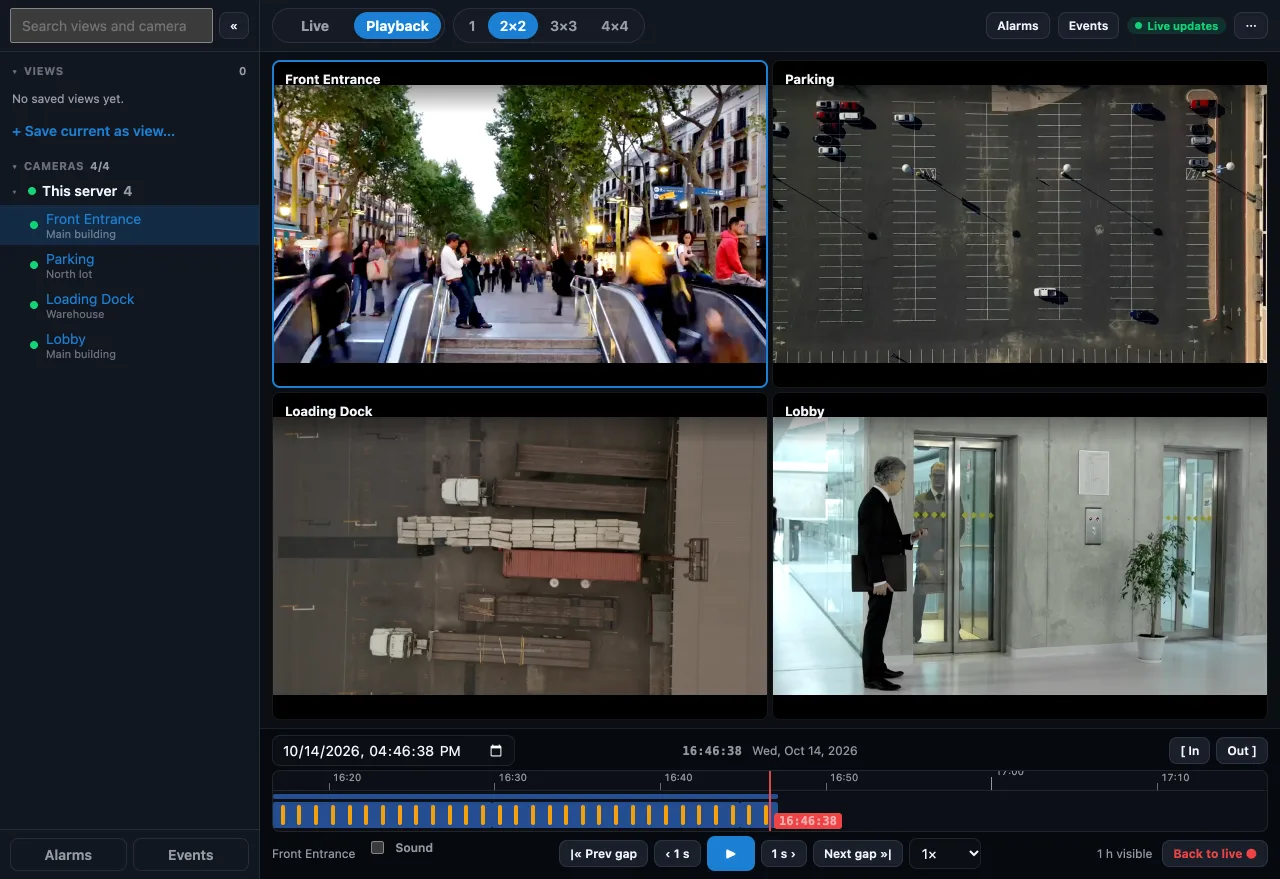
Sentinel Operator for macOS and Linux keeps views and cameras, grouped by server, in a left sidebar and switches between a Live and a Playback workspace without losing your place. Play several cameras back in sync, jump over gaps, and mark an In and Out point to export exactly the clip you need.

  • ✓ Synchronized playback across cameras on any server
  • ✓ Timeline with recording bands, gap jumping and variable speed
  • ✓ Export with In and Out marks
Sentinel Operator in Playback mode: a 2×2 grid of cameras above a timeline with recording bands, a current-time marker, transport controls, speed selector and In and Out export buttons
On-device AI · free

AI that understands what it sees

People, vehicles, faces, license plates, animals, and loitering, detected on your own machine: Apple's Vision framework on Mac, and a built-in detection model for people, vehicles and animals on Linux. No internet needed, no per-event cloud bill. Detections are marked on the timeline and listed in the event feed, so you can jump straight to what matters.

  • ✓ Six detection types on Mac, processed locally and free
  • ✓ Live person tracking with stable IDs and on-frame boxes
  • ✓ Cameras' own analytics are used too, over ONVIF Profile M

What runs where no cloud needed

Mac
Person, vehicle, face, license plate, animal, loitering
Linux
Motion, person, vehicle, animal. Runs on the CPU, no GPU needed
On the camera
Line crossing, intrusion, tamper and more, when the camera reports them
Cost
Free. Nothing leaves your machine
Cloud AI · Claude · bring your own key

Ask your footage anything

The AI features run on your own Anthropic (Claude) API key. Paste your key into the app once, and Claude turns raw detections into answers: a Ring-style sentence for whoever's at the door, a threat read on every event, and plain-English search across everything your cameras have seen. Calls go straight to Anthropic on your account, your key never leaves your server, and only the frames being described ever leave your machine.

Bring your own Anthropic key · you pay Anthropic directly, typically pennies per alert, no caps from us. Every other detector stays on-device and free.

  • ✓Scene descriptions: "person in a dark jacket left a package by the door"
  • ✓Threat classification: each event rated routine → suspicious, anomalies flagged on the timeline
  • ✓AI search: "anyone in a red shirt last night?" across every recorded event
  • ✓Daily digest: a plain-English recap of what happened today
Sentinel Mobile

Take it with you

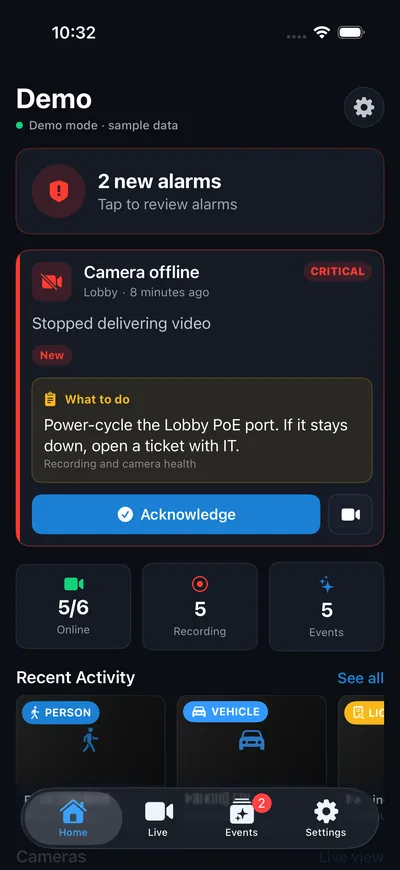
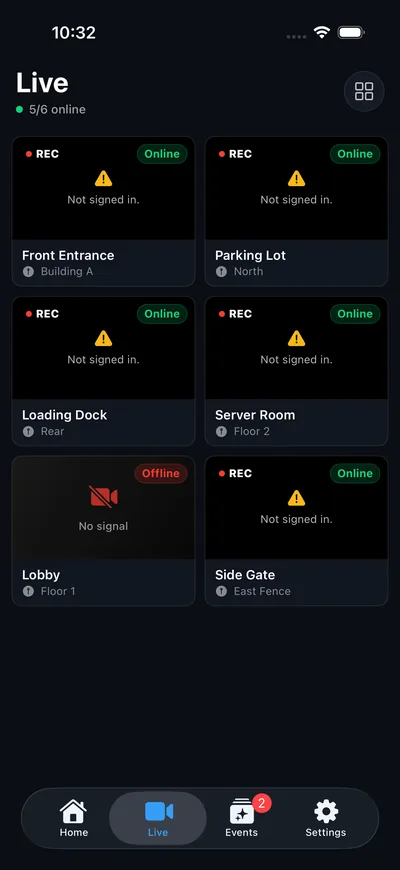
Sentinel Mobile connects to your sites, signs you in (including single sign-on), and puts alarms in your pocket: each alarm shows its instructions, so whoever is on call knows what to do. Watch live and play back recordings from anywhere, with no port forwarding. The current iPhone and iPad app is free on the App Store today.

  • ✓ Sites, with sign-in including SSO
  • ✓ Alarms with instructions, acknowledged from the phone
  • ✓ Live and playback anywhere, plus AI detections
Sentinel Mobile home screen in demo mode: two new alarms, a critical camera-offline alarm with a What to do instruction and an Acknowledge button, and online, recording and event counts
Sentinel Mobile Live tab in demo mode: a grid of six camera tiles with recording and online or offline status
Sentinel Mobile Events tab in demo mode: person and vehicle detections with a one-line description of each

Preview of Sentinel Mobile in demo mode with sample data.

Self-hosted & private

Own your footage. Every frame stays on your machine.

Your machines are the only servers. Recording and detection run on your hardware, and your video is never stored in anyone's cloud, including ours. When you watch from away, video streams through an encrypted tunnel straight from your machine to your phone, and is never kept on the way.

No cloud storage of your video Camera passwords encrypted at rest Evidence locked with SHA-256 fingerprints Remote access built in · no port forwarding Open source · Apache-2.0
Easy setup

Find your cameras in minutes

Sentinel discovers cameras automatically over ONVIF, mDNS, and an active subnet scan, with brand presets for Hikvision, Dahua, Axis, Reolink, Amcrest and more. Or add one by IP address or RTSP URL. The media engine is bundled, so there's nothing else to install.

  • ✓ Auto-discovery: ONVIF, Bonjour & subnet sweep
  • ✓ 12 brand presets + generic ONVIF / RTSP
  • ✓ Bundled GStreamer + MediaMTX, zero dependencies
Simple pricing

It's all free.

Unlimited cameras with full recording, live view, on-device AI, and remote access from anywhere, no subscriptions, nothing per camera. Optional Claude AI scene descriptions, threat reads, search & daily digest run on your own Anthropic API key, so you pay Anthropic directly. The iPhone app is always free. Donations welcome, never required.

Open source

Built by an installer. Open to everyone.

Sentinel started as a side project by a security installer who couldn't find an affordable VMS for the Mac. The full source for the Mac app, the iPhone app and the Linux server is public under the Apache-2.0 license. Read it, check how your footage is handled, or help build it.

Test it on your cameras Report bugs and ideas Contribute code
FAQ

Questions before you download

Everything you need to know about running Sentinel on your own hardware.

What is Sentinel 2.0?+
Sentinel 2.0 is a multi-server platform. One server program takes on roles: a Management Server (users, permissions, alarms, audit log and the web-based Sentinel Admin; it stores no video) and Recording Servers (they record and serve video, and keep working through Management Server outages). Small sites run both on one machine, and growing means enrolling another machine with a one-time token and one pasted command. It comes with Sentinel Admin in your browser, Sentinel Operator for macOS and Linux, and Sentinel Mobile. The Mac download is Sentinel Operator with the server included; the Linux download is the server.
Do I really not need the cloud?+
Correct. Sentinel runs entirely on your own Mac or Linux machines. Cameras stream to your machine over your local network, and recording plus on-device AI all happen there. Nothing is uploaded to a third-party server, and your cameras keep recording even fully offline.
Which cameras work with Sentinel?+
Any ONVIF camera, which covers the vast majority of IP security cameras. Sentinel auto-discovers them over ONVIF, Bonjour, and a subnet scan, with one-tap presets for Axis, Hanwha, Hikvision, Dahua and more, plus generic ONVIF/RTSP for everything else.
How does pricing work?+
Sentinel VMS is free. Unlimited cameras, full recording, live view, on-device AI, and remote access from anywhere are all included at no cost, with no subscriptions and nothing per camera. Optional AI scene descriptions run on your own Anthropic API key, so you pay Anthropic directly and nothing to us. The iPhone and iPad app is always free. Donations welcome, never required. See full pricing →
Do I need a subscription for the AI?+
No. The Claude-powered AI features are bring-your-own-key: you create an API key in your own Anthropic account and paste it into the app. Calls go straight to Anthropic on your account, your key stays on your machine, and you pay Anthropic directly (typically pennies per alert, with no caps or markup from us). On-device detection like person, vehicle, and license plate runs free without any key.
Do I need an account to download?+
Yes, a free one. You create a free account to download the app and get update notices, which also lets us tell who's using Sentinel. It's free, takes a second, and after that the app runs without signing in, even fully offline. There's no payment and no card, ever.
What do I need to run it?+
A Mac on macOS 13 or later (Apple Silicon or Intel), or a 64-bit Linux machine with systemd (x86-64 or ARM64, including Raspberry Pi 4/5), that stays powered on to record. The media engine is bundled, so there's nothing else to install. Recordings are written to your own disk, so how much history you keep is limited only by its size. See the full technical specs.
Continuous recording or motion-only?+
Both, configurable per camera. Record 24/7, or only when motion or a person/vehicle is detected. On-device AI marks motion, people, vehicles, faces, license plates, and loitering right on the timeline so you can jump straight to what matters.
Can I watch when I'm away from home?+
Yes, free. On your home Wi-Fi everything works out of the box, and remote viewing from cellular or any other network is included at no cost. It tunnels securely with no port-forwarding and nothing exposed on your router.
How private is my footage, really?+
Every recording stays on your machine; nothing is uploaded to us or stored in any cloud. Camera passwords are encrypted at rest (in the macOS Keychain behind Touch ID on Mac), and locked evidence carries a SHA-256 fingerprint so tampering is detectable. Remote viewing streams through an encrypted Cloudflare tunnel from your machine to your phone without being stored. Optional AI descriptions send the frames being described to Anthropic on your own API key.
Is Sentinel open source?+
Yes. The Mac app, the iPhone app and the Linux server are all on GitHub under the Apache-2.0 license. You can read the code, build it yourself, and send improvements. The name "Sentinel VMS" and the logo stay with Handoffgrid LLC, so modified versions need their own name.
If it's free, how will it be supported long term?+
Sentinel is a side project with no investors and no plan to start charging for what's free today. Because the code is open, it doesn't depend on one person: anyone can fix it, fork it or keep it running. Donations help pay for the Apple developer account, hosting and test cameras.
Is there a Linux or Windows version?+
Yes. Sentinel for Linux is in beta: the same self-hosted server for a mini-PC, NAS or home server, for x86-64 and ARM64, with a web dashboard and the free iPhone app. How to install it. A Windows version isn't planned yet.

Still have a question? Email us. We read every one.

Get started

Up and running in three steps

Free to download, free to run. The only optional extra is AI, on your own Claude key.

Step 1

Create your free account

A free account gets you the download and update notices. After that the app runs without signing in, even fully offline.

Step 2

Add your cameras

ONVIF auto-discovery finds cameras on your network, or paste an RTSP URL. Live view and recording start right away, for as many cameras as you like.

Step 3 · optional

Turn on AI with your Claude key

Paste your own Anthropic (Claude) API key in the app to add scene descriptions, threat reads, search, and a daily digest. You pay Anthropic directly, typically pennies per alert.

Get Sentinel

The Mac app (Sentinel Operator, server included) is ready to download, and Linux is in beta. The free iPhone companion lets you watch from anywhere.

Desktop app · version 2.1.0

Sentinel Operator for Mac

The Sentinel Operator app with the server included: run a server on this Mac, and connect to any Sentinel site. Discovery, recording, live view, playback and on-device AI. Unlimited cameras, free.

macOS 13+Apple Silicon & IntelDeveloper ID signedNotarized
Free account required. Confirm your email and the download starts automatically.
Server · beta · version 2.2.0

Sentinel for Linux

The self-hosted server for a mini-PC, NAS or home server: camera discovery, 24/7 recording, live view, motion, person & vehicle detection, alarms, and the free iPhone app. Runs as a service with a web dashboard.

x86-64 & ARM6464-bit Linux with systemdWeb dashboardBeta
Free account required. Unpack, run sudo ./install.sh, then open http://your-server:8090. Install guide
Field companion · free

Sentinel for iPhone

Pair with a QR code and watch live cameras, recordings, and AI alerts on your network, or anywhere with Remote Access. Free, no in-app purchases.

iOS 16+iPhone & iPadFreeNo tracking
Get it on the App Store
Free companion app. Pairs with your Mac or Linux server by QR code.

See what's new in Mac 2.1.0 and Linux 2.2.0 →

Technical specs

What it runs on

Sentinel records on a machine you own. Here's what the Mac app and the Linux server need, and what comes in the box.

Sentinel Operator for Mac Version 2.1.0

Operating system
macOS 13 Ventura or later
Processor
Apple Silicon or Intel (universal app)
Cameras
Unlimited. Any ONVIF or RTSP IP camera
Discovery
ONVIF WS-Discovery, Bonjour and subnet scan, 12 brand presets
Video
H.264 and H.265, recorded at the camera's native quality
Recording
24/7 or motion/AI-triggered, per camera. Fragmented MP4 segments on your own disk
Live view
1, 4, 9 or 16-tile grid over HLS, about 6–8 s latency
On-device AI
Apple Vision: person, vehicle, face, license plate, animal and loitering
Camera analytics
Uses the camera's own detection over ONVIF Profile M: person, vehicle, face, plate, line crossing, intrusion, loitering and tamper
Media engine
GStreamer and MediaMTX bundled in the app
Security
Camera passwords in the macOS Keychain behind Touch ID. SHA-256 evidence fingerprints
Remote access
Built-in encrypted Cloudflare tunnel, no port forwarding
Updates
Daily check tells you when a new version is out. Can be turned off
Distribution
Developer ID signed and notarized by Apple

Sentinel for Linux Version 2.2.0 · beta

Operating system
64-bit Linux with systemd: Ubuntu, Debian, Raspberry Pi OS and similar
Processor
x86-64 (Intel/AMD) or ARM64 (Raspberry Pi 4/5, ARM servers)
Cameras
Unlimited. Any ONVIF or RTSP IP camera
Discovery
ONVIF WS-Discovery on every network interface, optional subnet sweep, add by IP
Video
H.264 and H.265, recorded at the camera's native quality
Recording
24/7 with retention. Fragmented MP4 segments in /var/lib/sentinel
Interface
Web dashboard on port 8090, in any modern browser
On-device AI
Motion, plus person, vehicle and animal detection (YOLOX-Tiny on ONNX Runtime). Runs on the CPU, no GPU needed
Camera analytics
Uses the camera's own detection over ONVIF Profile M: person, vehicle, face, plate, line crossing, intrusion, loitering and tamper
Bundled
MediaMTX, ffmpeg, ONNX Runtime and cloudflared. Nothing else to install
Security
Runs as an unprivileged user in a hardened systemd sandbox. Only port 8090 exposed. Camera passwords encrypted (AES-256-GCM), hash-chained audit log
Remote access
Bundled Cloudflare tunnel for the iPhone app, no port forwarding
Updates
Daily check shows new versions in the dashboard. Can be turned off
In progress
PTZ control, clip export and push alerts

Storage is limited only by your disk. Full details and source are on GitHub.

Install Sentinel for Linux (beta)+

Works on 64-bit Linux with systemd: Ubuntu, Debian, Raspberry Pi OS and similar. Pick x86-64 for Intel/AMD machines and ARM64 for ARM boards like the Raspberry Pi 5. The media engine, person & vehicle detection and remote access are all included; nothing else to install.

tar xzf sentinel-2.2.0-linux-*.tar.gz
cd sentinel-2.2.0-linux-*/
sudo ./install.sh

Then open http://your-server:8090 in a browser on the same network, create the administrator account, and use Scan network on the Cameras page. To watch from your phone, install the free Sentinel VMS app and pair it from the dashboard's iPhone page. Upgrading is the same three commands with the new download; your cameras and recordings are kept.

This is a beta. Please send problems and feedback to [email protected].

SHA-256
x86-64 37380786aec827796a357f12fa359768f150477589c4ef176c798ecb9511326f
ARM64 ddf2e549a5f76ace4c56e8b1efe39ac1319ef9ffd11e32e05f006191e90aff37