Sentinel is a free, self-hosted video management system for IP cameras. Record every camera at full quality, get alerts for people and vehicles, and watch from anywhere, while every frame stays on hardware you own. Start on one machine and grow to many. No subscriptions, ever.
Mac & Linux · iPhone app on the App Store · unlimited cameras, free
Sentinel Operator, Sentinel Admin and the multi-server platform are all included, shown below.
Sentinel Mobile is the free iPhone app for everyone on your site: live view, alarms with instructions, playback and push alerts through Sentinel Cloud, at home or away. Folded, the iPhone Duo runs it as the phone app you know. Unfold the iPhone Duo and the same app lays itself out for the big screen: a sidebar instead of tabs, a dashboard with your alarms and cameras side by side, events with the detail next to the list, and a Focus layout that puts one camera large with the rest at hand. Fold it mid-stream and the video keeps playing.
iPhone Duo, unfolded: the Home dashboard.
iPhone Duo, unfolded: Live, three across. Focus puts one camera large.
iPhone Duo, unfolded: Events, with the detail beside the list.
Closed, the Duo is a 5.4-inch iPhone and Sentinel Mobile behaves like one: Home, Live and Events, one hand, one thumb.
All screens in demo mode with sample data. The iPhone Duo layouts are in Sentinel Mobile 3.3.1 and later.
A server that records and watches, an operator app for the people on shift, and a phone app for everyone else. Install the parts you need; they find each other.
Runs on a Mac or a Linux box in the building. Connects to the cameras, records, detects motion, people and vehicles, and raises alarms. Open its address in any browser and you get the full Operator, with Sentinel Admin inside it: users, rules, recording modes, retention, and the optional Sentinel Cloud link. Start with one machine; add recording servers as the site grows.
The app for whoever is watching, native on the Mac and as a desktop app on Linux. A live wall across displays, alarms with the clip attached, a timeline for investigations, bookmarks, exports and evidence packages. It talks to the server on your network, or to several sites at once.
The iPhone app for everyone else. Live view with PTZ, alarms with snapshots, playback and push notifications. It can also work as a camera. At home it talks to the server directly; away from home it uses the optional Sentinel Cloud relay, with no port forwarding.
Server and Operator are one download on the Mac. On Linux the server and the Operator desktop app (.deb or AppImage) are separate downloads, and the iPhone app connects to either.
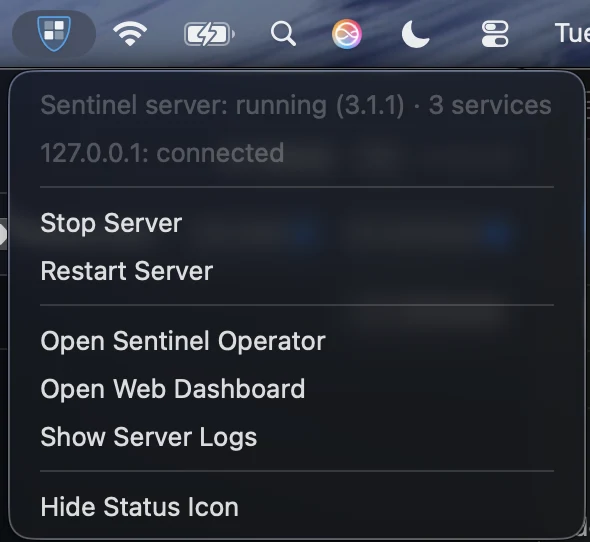
The Sentinel shield sits in your menu bar and shows the server at a glance: blue when it is running, red when it is stopped or your site can't be reached. Click it to start, stop or restart the server, open the web dashboard, or jump to the logs. It works for a single server or a whole site of management and recording servers on one Mac.
Sentinel is a single server program that can take on different roles. Small sites run everything on one machine; bigger ones add machines as they grow.
Users and permissions, alarms and rules, the audit log, and the web-based Sentinel Admin. It stores no video, so it stays small and easy to back up.
Connect to cameras, record, detect, and serve video straight to viewers. They keep recording, and keep serving live and playback, even if the Management Server is down.
Sentinel Operator on macOS and Linux, and in any browser at your server's address, with the same rail everywhere. Sentinel Admin sits inside it. Sentinel Mobile for iPhone.
The downloads below are Sentinel Operator for Mac 3.8.1 (server included), the Sentinel 3.8.1 server for Linux and Sentinel Operator 3.8.1 for Linux.
Start with one machine running both roles. When the site grows, enroll another machine as a Recording Server with a one-time token: paste one command on the new machine and it joins. Sentinel Admin shows every server, its status, cameras, free storage and the health of its recordings disk in one place.

Every setting lives in one site navigation tree: servers, devices, rules and events, security, system dashboard and logs. Admin is the last item on the same rail as Live and Playback. Build custom roles on a permission matrix, draw weekly time profiles that gate when rules fire, and post signed webhooks to the rest of your stack. On the Mac, the same tree opens as a native Management window.

Set a default for the whole server and change any camera. Keep weeks of video on the disk you have, and never lose the moments that matter.

Sentinel Operator on the Mac, on Linux and in the browser shares one rail: Home, Live, Map, Events, Search, Exports, Alarms, Incidents, Monitor, Reports, Insights, Rules, People, Plates and Admin. Play several cameras back in sync, see every detection and alarm on the timeline, jump over gaps, and mark an In and Out point to export exactly the clip you need.

Each alarm carries its instructions, the snapshot and a link to the recording. Acknowledge it, snooze it, add a note, or open it in an incident with its clips. Rules decide what raises an alarm, when, and who hears about it.

People, vehicles, animals, faces, license plates and loitering, detected on your own machine by a built-in model. The same detectors run on the Mac and on Linux. No internet needed, no per-event cloud bill. Detections are marked on the timeline and listed in Events, so you can jump straight to what matters.

The AI features run on your own Anthropic (Claude) API key. Paste your key into the app once, and Claude turns raw detections into answers: a plain sentence for whoever's at the door, a threat read on every event, and plain-English search across everything your cameras have seen. Calls go straight to Anthropic on your account, your key never leaves your server, and only the frames being described ever leave your machine.
Bring your own Anthropic key · you pay Anthropic directly, typically pennies per alert, no caps from us. Every other detector stays on-device and free.

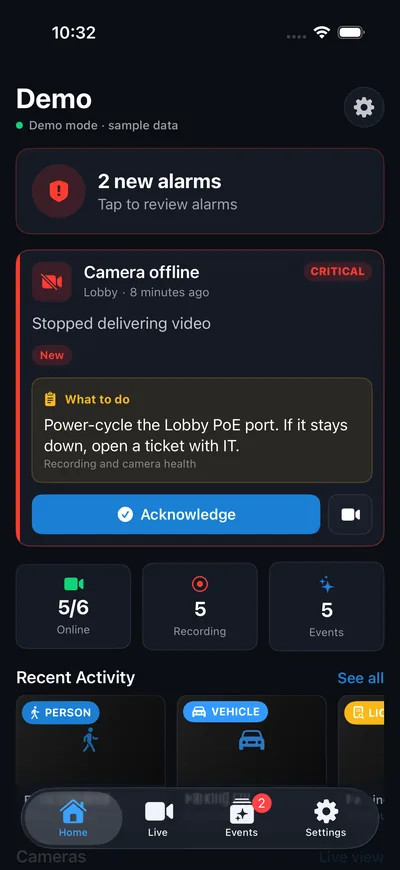
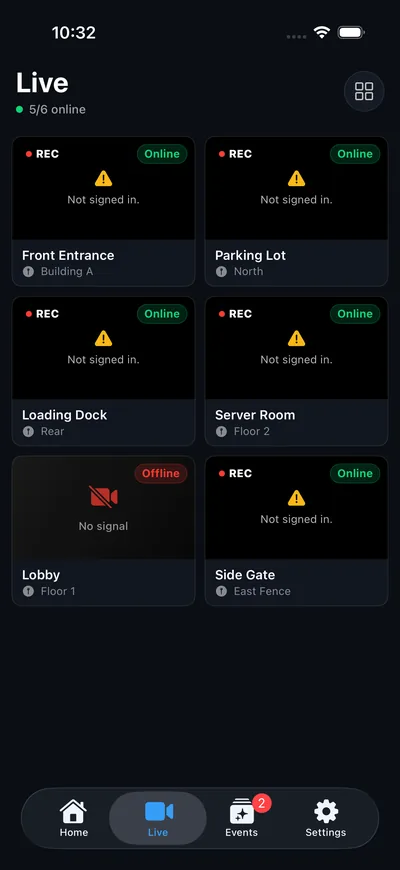
Sentinel Mobile connects to your sites, signs you in (including single sign-on), and puts alarms in your pocket: each alarm shows its instructions, so whoever is on call knows what to do. Watch live and play back recordings from anywhere, with no port forwarding. The iPhone and iPad app is free on the App Store. Push alerts, using the phone as a camera and sending videos use Sentinel Cloud.


iPhone: Sentinel Mobile in demo mode with sample data.
Your machines are the only servers. Recording and detection run on your hardware, and your recordings are never stored in anyone's cloud, including ours. When you watch from away, video streams through an encrypted connection straight from your machine to your phone, and is never kept on the way. The only things that leave are the ones you switch on: Sentinel Cloud's offsite copy of alarm snapshots and clips, and frames sent to Anthropic on your own key.
Scan network finds ONVIF cameras on your network, and Scan whole subnet sweeps for the ones that don't answer. Or add one by IP address or RTSP URL. Find streams asks the camera what it offers, knows the usual second-stream addresses of common brands, and picks the right second stream for live view, detection and low-res recording. The media engine is bundled, so there's nothing else to install.

Unlimited cameras with full recording, live view, on-device AI, and remote access from anywhere, no subscriptions, nothing per camera. Optional Claude AI scene descriptions, threat reads, search & daily digest run on your own Anthropic API key, so you pay Anthropic directly. The iPhone app is always free. Sentinel Cloud is an optional extra from $4.99 a month: a permanent remote address, push alerts and offsite backup. Donations welcome, never required.
Sentinel started as a side project by a security installer who couldn't find an affordable VMS for the Mac. The source for version 3.6.1 of the Mac app, the iPhone app and the Linux server is on GitHub under the Apache-2.0 license; newer versions are licensed AGPL-3.0. Read it, check how your footage is handled, and tell us what you find.
Everything you need to know about running Sentinel on your own hardware.
Still have a question? Email us. We read every one.
Free to download, free to run. The only optional extra is AI, on your own Claude key.
A free account gets you the download and update notices. After that the app runs without signing in, even fully offline.
ONVIF auto-discovery finds cameras on your network, or paste an RTSP URL. Live view and recording start right away, for as many cameras as you like.
Paste your own Anthropic (Claude) API key in the app to add scene descriptions, threat reads, search, and a daily digest. You pay Anthropic directly, typically pennies per alert.
The Mac app (Sentinel Operator, server included) is ready to download. On Linux, get the server and the Sentinel Operator desktop app. The free iPhone companion lets you watch from anywhere.
The Sentinel Operator app with the server included: run a server on this Mac, and connect to any Sentinel site. Discovery, recording, live view, playback and on-device AI. Unlimited cameras, free.
The self-hosted server for a mini-PC, NAS or home server: camera discovery, 24/7 recording, live view, motion, person & vehicle detection, alarms, and the free iPhone app. Runs as a service with a web dashboard.
sudo ./install.sh, then open http://your-server:8090. Install guideThe operator desktop app for Linux: Home dashboard, live view and saved views, synchronized playback, events, alarm handling, search and exports. Connects to any Sentinel site, on this machine or across the network.
sudo apt install ./sentinel-operator-*.deb, or make the AppImage executable and run it.Pair with a QR code and watch live cameras, recordings and alarms on your network, or anywhere with remote access. Can also work as a camera with Sentinel Cloud. Free, no in-app purchases.
Get it on the App StoreSentinel records on a machine you own. Here's what the Mac app and the Linux server need, and what comes in the box.
/var/lib/sentinel)8090 in any modern browser, with Admin inside it, and the Sentinel Operator desktop app (.deb or AppImage)Storage is limited only by your disk. The 3.6.1 source is on GitHub.
Works on 64-bit Linux with systemd: Ubuntu, Debian, Raspberry Pi OS and similar. Pick x86-64 for Intel/AMD machines and ARM64 for ARM boards like the Raspberry Pi 5. The media engine, person & vehicle detection and remote access are all included; nothing else to install.
tar xzf sentinel-3.8.1-linux-*.tar.gz cd sentinel-3.8.1-linux-*/ sudo ./install.sh
Then open http://your-server:8090 in a browser on the same network, create the administrator account, and use Scan network under Admin, Devices, Cameras. To watch from your phone, install the free Sentinel VMS app and pair it from Admin, Devices, iPhone Pairing. Upgrading is the same three commands with the new download; your cameras and recordings are kept.
Or run it with Docker. The image works on Intel and ARM machines and includes everything Sentinel needs. It is public, so no sign-in is needed:
docker run -d --name sentinel --network host -e TZ=Etc/UTC \ -v sentinel-data:/data --restart unless-stopped \ ghcr.io/hackgiz/sentinel-vms:3.6.1
The Docker image is still 3.6.1 (Apache-2.0); the 3.8.1 server ships as the tarballs above.
Use --network host on Linux: camera discovery and the iPhone pairing code depend on it. Set TZ to your time zone, for example America/New_York. Upgrades keep your data in the sentinel-data volume.
Problems or feedback? Write to [email protected].
SHA-256
x86-64 d14c1dc83289cf18af0db507e47af645fda47684d4c746ada4f42fb2d8479d22
ARM64 0d407d7464b036adb85ac91e3a65b086c6183680d702fb84cf99e56ade56a758
Create a free account to download Sentinel for Mac. Confirm your email and the download starts automatically. No charge, no card, ever.